
All five active Stadium Simulator 2 codes are confirmed working as of March 2026. Redeeming them hands you free fans, the main in-game currency and capacity boosts that expand your stands. Enter them through the Store button in-game after joining the Seriously Dude Official Roblox group, or they won’t register.
All Working Stadium Simulator 2 Codes (March 2026)
Here’s every active code right now, what it rewards, and what that reward actually does for your stadium build:
| Code | Reward | What It Does |
|---|---|---|
Release |
Fans | Spend on upgrades, stands, and facilities |
250Likes |
500 Capacity | Unlocks larger stands for bigger crowd income |
350Likes |
350 Capacity | Adds medium stand space earlier in your build |
1KFavs |
400 Capacity | Solid mid-game seat expansion |
100KVisits |
Fans | Extra currency for stadium improvements |
Expired Stadium Simulator 2 Codes
None at this time. This list stays updated, check back before every weekend, since developers tend to drop new codes alongside game updates or milestone announcements.
How to Redeem Stadium Simulator 2 Codes
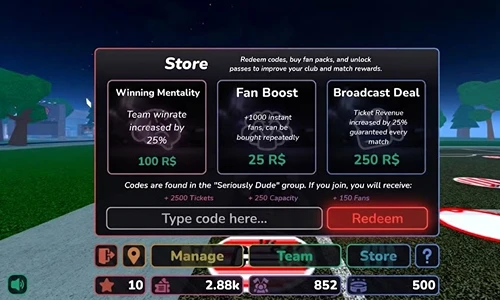
Most failed redemptions come from one skipped requirement: group membership. Sort that first.
Step 1: Join the Seriously Dude Official Group Head to the Roblox group page for Seriously Dude Official and hit Join. This isn’t optional. Codes simply won’t process if you skip it, and the game won’t always tell you why.
Step 2: Launch Stadium Simulator 2 and Load Your Stadium Open the game and press Play in the main menu. Wait for your stadium to fully load before attempting anything, entering a code mid-load can cause it to fail silently.
Step 3: Open the Store Tap the Store icon in the bottom-right corner of your screen. It’s the shopping bag or ticket icon depending on your device.
Step 4: Enter Your Code Paste the code exactly as written into the text field. Capitalization matters. Release isn’t the same as release. Copy-paste directly from this list to avoid typos.
Step 5: Hit Redeem Tap Redeem and watch your fans or seat capacity register. You’ll see an on-screen notification confirming the reward.
If you play other Roblox simulator games, the same redeem process applies in Gym Star Simulator, worth checking if you run multiple games.
What Should You Do With Your Rewards?
Fans and capacity aren’t equal at every stage of your build. Here’s how to prioritize:
| Game Stage | Best Use of Rewards |
|---|---|
| Early game (0-500 fans) | Use fans from Release and 100KVisits on ticket booths and food stalls for passive income |
| Mid game | Stack capacity codes – 250Likes, 1KFavs, 350Likes, before cosmetic upgrades |
| Late game | Fan rewards become critical again; redeem any new drops immediately |
Pro Tips
Redeem capacity codes before scheduling highly attended matches, the seat boost will only apply to your next scheduled event you are hosting, and will not retroactively reward a past event.
If a code returns that it has been “already redeemed” but you do not remember using the code, check your account on another device. Redemption history is synced across sessions on Roblox.
New codes typically drop when the game hits Roblox milestones (likes, favorites, visits). Following the game’s page lets you catch these within hours.
Don’t sit on fans. The upgrade economy is front-loaded, early facility upgrades generate disproportionately more income per fan spent than late-game cosmetic items.
FAQ
What are all the working Stadium Simulator 2 codes in March 2026?
How do you redeem codes in Stadium Simulator 2?
What do Stadium Simulator 2 codes give you?
Why is my Stadium Simulator 2 code not working?
Do I need to join a group to redeem Stadium Simulator 2 codes?
What is fans currency used for in Stadium Simulator 2?
Where can I find new Stadium Simulator 2 codes?
What to Do Right Now

Redeem all five active codes before they expire, especially the capacity codes if you’re currently building out your stands. If you haven’t already joined the Seriously Dude Official group, do so now, bookmark this page for the next code drop, and keep an eye on the game’s Discord for milestone announcements.
If you play a range of games, the active lists for Pet Simulator 99, Dragon Adventures and Huzz RNG are all worth bookmarking for Roblox freebies as well.